full FP16/BF16 speed on two RTX 3090s: real benchmarks
Gaming graphics cards are often used to run AI at home or in small offices. They have a hidden speed limit that the more expensive professional versions of the same card don't. A free tool removes that limit. We tried it on two of our cards to see if it's worth it.
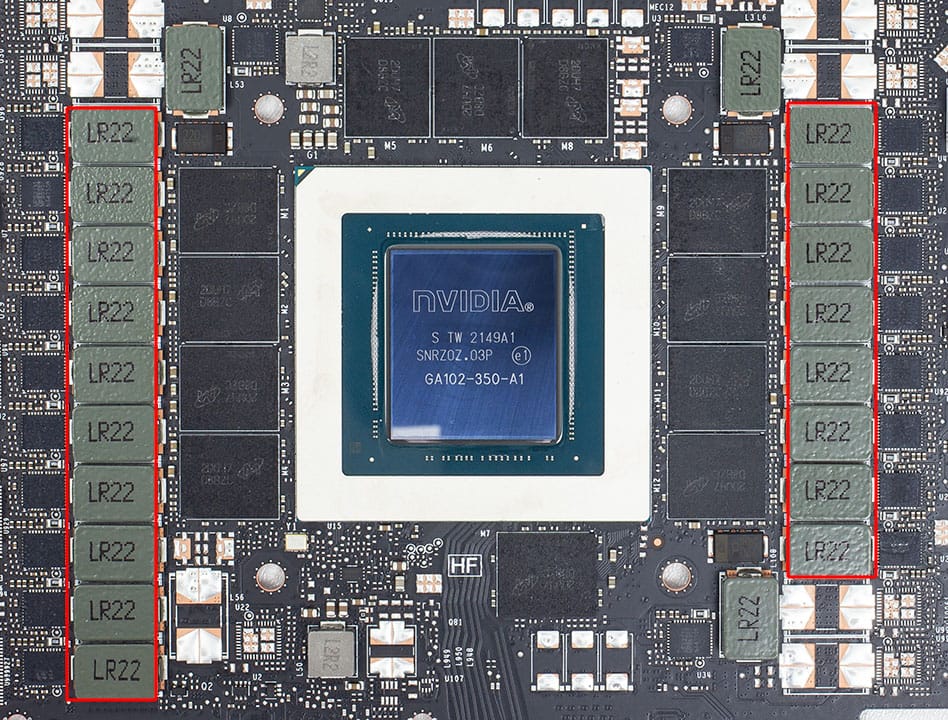
Unlocking full FP16/BF16 speed on two RTX 3090s: real benchmarks
NVIDIA's consumer Ampere cards (RTX 30 series) run FP16/BF16 tensor math that adds results in FP32 at half the rate the hardware can do. Professional cards built on the same chip don't have this cap. A new
open-source project, gpu-unlock, removes the limit on Linux. I tried it on a two-GPU inference box and measured before and after.
The setup
- 2× RTX 3090, each at the stock 350 W power limit
- Ubuntu 24.04, NVIDIA 595.99.02 open kernel module
- gpu-unlock v1.1.0
- Benchmarks: PyTorch 2.11 (CUDA 12.8), plus Ollama with two popular compressed models: a 27B model at Q4_K_M and a 20B model at MXFP4
How it works
gpu-unlock is a small kernel module that runs at boot, before the NVIDIA driver loads. It sets the card's math speed setting to full rate, resets the card, and then hands it to the normal driver. It doesn't
patch the NVIDIA driver and doesn't make the card pretend to be a different model, so driver updates don't break it.
Installing it on Ubuntu took three steps:
git clone https://github.com/Zagitta/gpu-unlock
cd gpu-unlock
make install
Then add gpu_unlock.targets=all to GRUB_CMDLINE_LINUX_DEFAULT in /etc/default/grub, run sudo update-grub, and reboot. Check that it worked with journalctl -k -b | grep gpu_unlock, which should show
gpu_unlock: unlocked for each card.
Results: raw compute
This is the same test the project uses: a dense 8192×8192 matrix multiply, FP32 accumulation, median of 5 samples.
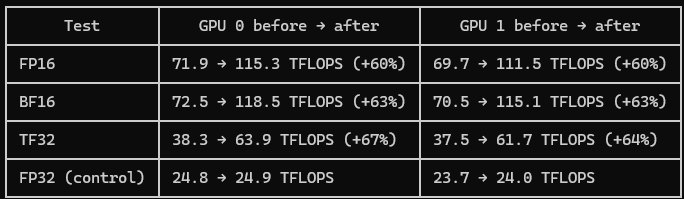
FP32 stayed flat, as expected, which shows the gains come from the unlock and not from noise or a different setup.
Results: Ollama
8.5k-token prompt, median of 3 runs:

Ollama barely moved. Compressed models like these run on integer math paths, not the FP16/BF16 tensor math the unlock speeds up. Response speed also depends mostly on memory bandwidth, which the unlock
doesn't change.
What's an FP16/BF16 workload?
Most models are released with their weights stored as 16-bit numbers (FP16 or BF16). That's the uncompressed version. Ollama models like Q4_K_M are compressed to about 4 bits per weight, about a quarter of
the size. Compression is how a 27B model fits on a 24 GB card.
At 16 bits, each billion parameters needs about 2 GB of VRAM. With 48 GB across two 3090s:
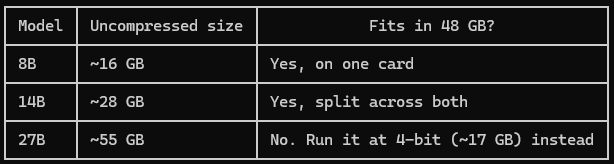
For general chat, a compressed large model usually beats an uncompressed small one. Many other workloads run in FP16/BF16, though, and those are the ones the unlock speeds up.
What you can run uncompressed on 2× 3090
Search and retrieval (RAG)
- Embedding models turn documents into searchable vectors. They're small, fast, and usually run uncompressed because compressing them hurts search quality.
- Rerankers re-sort search results so the best match comes first. An embedding model plus a reranker is the core of a private "ask questions about your documents" system.
Speech and audio
- Speech-to-text (Whisper large-v3) runs in FP16 on a few GB of VRAM, much faster than real time.
- Text-to-speech models for natural-sounding voice output.
Images and vision
- Image generation: SDXL fits easily. Larger models like Flux.1-dev (12B) are about 24 GB uncompressed, which is a squeeze on one card.
- Vision-language models read images, screenshots and scanned documents, then answer questions or pull out structured data.
- OCR and layout models turn PDFs and scans into clean text.
Small, task-specific LLMs
- 7B–14B models uncompressed for high-volume, simple jobs: classification, tagging, pulling structured data out of text, short summaries. With a batching server like vLLM, a single 3090 can process thousands
of items an hour. - Code autocomplete with small coder models behind an editor plugin.
Training
- LoRA fine-tuning of 7B–14B models in BF16 on your own data. A small model tuned for one narrow task often beats a much larger general model at it. This is where the unlock helps most.
- Training small classifiers on your own labeled data.
Serving compressed models in vLLM. vLLM's common 4-bit formats (AWQ, GPTQ) unpack weights and do the heavy math in FP16. A compressed model served through vLLM should get some of the faster prompt
processing, while the same model in Ollama doesn't. I haven't tested this yet.
If all you do is chat with compressed models in Ollama, don't expect a difference. If you run any of the workloads above, this is free speed.
Why +60% and not 2×?
The power limit. Unlocked, each clock cycle does about twice the work and draws more power. To stay under 350 W, the cards dropped from about 1,700 MHz to about 1,400 MHz. Twice the work per cycle at about
18% fewer cycles comes out to roughly 1.6×. The project's author got +80% on BF16 with a 3090 Ti at 450 W, so more power gets you closer to 2×. Most 3090s can't go much past 350 W without different firmware,
so there's little room to go higher.
Temperatures
I logged temperature every second through both runs. Peaks were the same before and after the unlock: 55 °C and 60 °C, with both cards at their 350 W limit. At a fixed power limit, faster math doesn't add
heat. The card just does more work with the same power.
Undoing it
Remove gpu_unlock.targets=all from the GRUB command line, run update-grub, and reboot. The module does nothing without that setting.
Bottom line
At stock power the unlock gives about 60% more FP16/BF16 throughput with no extra heat, and it was easy to install and undo. Whether you'll notice depends on what you run. Compressed chat models in Ollama
see little to no change, while embeddings, speech, vision, image generation, vLLM serving, and fine-tuning are where it pays off.